Risa Tips & Tricks: How to Use Our Structural Analysis Software

July 27, 2026

Why Aren't My Connections Transferring? A Guide to Exporting Connections To RISAConnection

No engineer wants to receive an error message when moving through their design. It slows the progress, creates uncertainty, and adds unnecessary rework. RISA’s integration is designed to eliminate this frustration and transition from member design to connection design seamlessly! Key Takeaways: Assign connection type to branch member of connection Ensure member type in RISA-3D is correct and compatible with selected connection type Check assumptions and limitations of selected connection type Designate connection type based on behavior at a specific node rather than individual members If you’re new to using this integration, start with the article below to learn the typical workflow. Still not sure why your connection isn’t transferring? Below are the most common causes of failed transfers and how to quickly fix them. Connection assigned to the incorrect member Reason: RISAConnection expects the connections to be assigned to specific members within the connection based on the geometry and type. Unsupported connections will not transfer from RISA-3D. Fix: Assign connection type to the branch member. Example: For beam-to-column connections, assign the connection to the beam end only. The column does not need a connection type assigned. Incorrect member type assigned Reason: Members in RISA-3D are assigned a “Member Type”…

Read More

RISA-3D (21)

August 31, 2016

Why Do My Wide Flange Members Fail in the AISC 14th Edition Code?

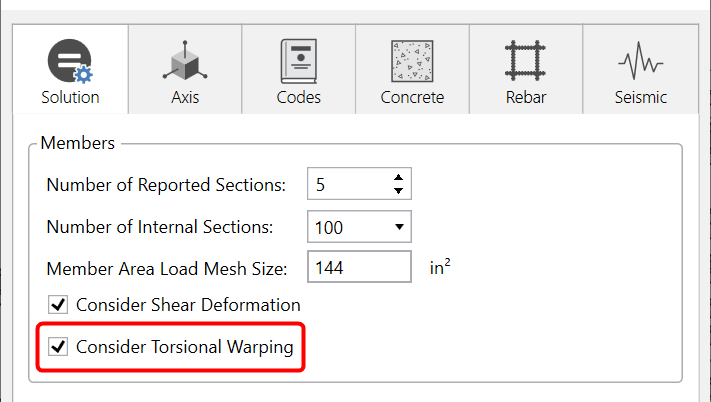
In RISA-3D’s addition of the AISC 14th Edition code we added Section E4...
Read More
August 17, 2016

How Does RISA-3D Account for Torsional Warping?

Twisting of a member or frame induces torsional forces and stresses. This...

Read More
August 16, 2016

Why Can’t I See My RISASection Shapes in the Shape Database?

When using RISA Integration between RISASection and RISA-3D, RISA-2D...

Read More
March 26, 2016

Improved Wall Panel Results

Wall Panel Forces Spreadsheet The power of RISA is the easy to access...

Read More
March 18, 2016

How Do I Find A Failing Member in the Model?

You may find that when looking at the Code Check spreadsheet that a given...

Read More
March 10, 2016

Importing Recorded Seismic Ground Motions

The Pacific Earthquake Engineering Research center (PEER) has a large...

Read More
February 24, 2016

What are the Ramp Up/Coast Down Functions in Time History?

Ramp Up Function RISA allows you to define “Ramp Up Functions” to control...

Read More
January 20, 2016

Why Did My Reinforcing Change in ACI 318-14?

The new ACI 318-14 code has been implemented into RISA-3D V14, RISAFloor...

Read More
January 14, 2016

Importing a Time History Function

New in RISA-3D v14 is the introduction of a Time History analysis feature....

Read More

Subscribe to Our Newsletter

Our monthly "Structural Moment" newsletter is the best way to keep up with RISA’s product updates, new releases, new features, training events, webinars and more...