October 2, 2018
Wood Design per AWC NDS 2018 Wood Code
The new AWC NDS 2018 code has been implemented into RISA-3D v17.0 and RISAFloor v13.0. To select this code for your design, simply choose this code from the Codes tab within Model Settings.
Powerful Tools Don’t Help If They’re Left Unused Many engineers evaluate analysis software based on core modeling and design checks. But once a demo is over, some of the most impactful features are the ones that quietly save time on real projects — especially mid-size jobs where efficiency matters most. These aren’t advanced edge-case tools. They’re everyday features that often go underused. Diaphragm Forces: See Load Paths Instead of Guessing Diaphragm force output is one of the most valuable — and least leveraged — parts of a full building model. Instead of relying on manual distribution or conservative assumptions, engineers can directly see how loads are flowing to vertical elements. For mid-size structures, this clarity can mean: Fewer overdesigned collectors More confidence in lateral load paths Faster review and revisions when layouts change Batch Results: Review Smarter, Not Longer Batch results allow engineers to review multiple load cases, members, or design checks in a single pass. Instead of hunting through individual reports, patterns become obvious quickly. On mid-size jobs, this speeds up: QA/QC reviews Iterative design changes Comparing “before and after” scenarios It’s not about skipping checks — it’s about seeing the full picture sooner. Design Iteration Speed Is the…
Read More
The new AWC NDS 2018 code has been implemented into RISA-3D v17.0 and RISAFloor v13.0. To select this code for your design, simply choose this code from the Codes tab within Model Settings.
RISA-3D v15 includes "analysis offsets" which moves the centroid of the member for analysis allowing for flexibility in how members are designed. Let's use a WT brace to demonstrate how this feature can be utilized. When you model a WT brace it exists at the member centroid, which means that no...
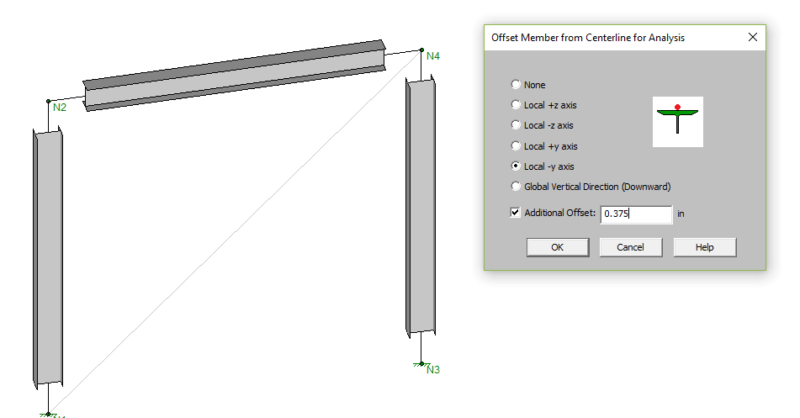
In a previous article we discussed how the Analysis Offsets feature in RISA-3D works and how it can be used to model members at top of steel. In this article, we will discuss some specific situations and how the results change with the analysis offset set as top of member (local -y axis).
Have you ever wondered what the Analysis Offset feature does? Let’s take a look at how this feature can be used to model members at top of steel.
The new AISC 360-16 15th Edition changes have been implemented into RISA-3D v17.0 and RISAFloor v13.0.
“Why am I receiving a P-Delta instability error when I run my DL + LL load combination? I don’t see this error when I run my lateral load only combination.”
One of the support questions we get most often is, “How can I model a cable element in RISA-3D?” Cables that are straight and experience only axial loading can be easily modeled. When modeling structures with cables (such as guyed structures) the cables can be modeled as tension only and doing so...
For concrete column members, the load combination producing the maximum shear code check is reported in the Detail Report and corresponding Results spreadsheet. Since concrete is evaluated based on a batch solution, this can be useful when shear governs the design.
RISA-3D includes material specific checkboxes on the Design tab of the Load Combinations spreadsheet that allow you to define the load combinations that shall be checked for members of different materials.
Our monthly "Structural Moment" newsletter is the best way to keep up with RISA’s product updates, new releases, new features, training events, webinars and more...